Problems with spyware:Several problems present themselves when a user has spyware on their system.
P0rnographic advertising:Spyware creates targeted advertisements can be a problem. The ads will be created from information such as websites and advertisements visited previously. If children are using the same computer, this can be a problem. If the 4dult user visits a p0rnographic site, the minor could receive targeted advertisements which contain p0rnographic material. Sometimes the targeting of ads can be for p0rnographic advertisements without anyone having visited 4dult sites.
Annoyance:Spyware can be a huge annoyance to computer users. Created Pop Up ads often appear when web pages are opened or closed. This can cause hours of wasted effort because many of the Pop Ups create more popup ads as they are closed, in an ever expanding cycle.
Computer Memory and CPU Resource:Some spyware allows the unauthorized use of computer memory and cpu resources. This includes running programs while a PC is not busy. However, increased use of a computer memory, processor and harddisk increases the wear and tear on the components, and reduces its functional lifetime. In some cases resources are used for malicious purposes, such as mailing spam or viruses to everyone in your addressbook.
Lose control of your PC:Spyware can change browser's homepage and other settings without the user's knowledge or permission. These changes can include turning off firewall and security protection so the spyware can communicate with external resources, making them potentially dangerous.
Simple Steps for Removing Spyware from Your Computer Restart computer in Safe Mode (with Networking)
How to Restart Computer in Safe Mode :
Some computers have a progress bar that refers to the word BIOS. Others may not let you know what is happening. As soon as the BIOS loads, begin tapping the F8 key on your keyboard. Do so until the Windows Advanced Options menu appears. If you begin tapping the F8 key too soon, some computers display a "keyboard error" message. If this happens, restart the computer and try again. Using the arrow keys on the keyboard, select Safe mode (with Networking)
Download
CWShredder and save it to your Desktop.
Download
spybot - Search & Destroy and install it
Download
ad-aware and install it. Make sure you click on check for updates before scanning
Download HijackThis from
Here How to Remove Spyware from your Computer CWShredder (Freeware)
CWShredder finds and removes traces of CoolWebSearch. CoolWebSearch is a name given to a wide range of different browser hijackers. Though the code is very different between variants, they are all used to redirect users to coolwebsearch.com and other sites affiliated with its operators.
The CoolWebSearch Trojan installs dozens of links in Favourites, mostly to p0rn sites on your desktop; it also adds toolbar to Internet Explorer and changes your homepage without asking you. and it also significantly slows down the performance of your computer, and it modify some files which cause Windows to freeze, crash, random reboot etc.
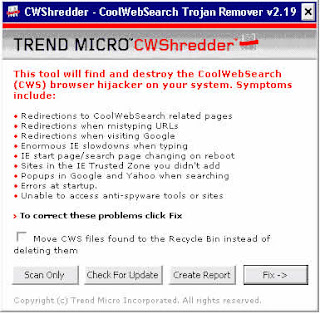
Start CWShredder and you can choose "Fix"
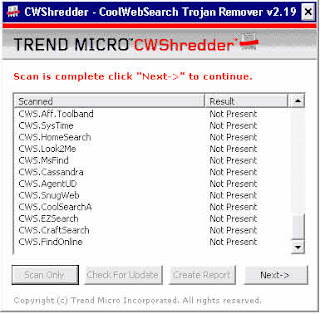
If your computer has Trojans then you can fix it by clicking Next.
"CoolWebSearch encompasses a wide family of browser hijacker spyware programs. This spyware is frequently updated, to avoid anti-spyware software from removing it. CWShredder is widely regarded as the only solution to effectively remove CoolWebSearch spyware. " - (PC Magazine, August 2004)
Spybot - Search and Destroy (Freeware)
Spybot - Search and Destroy is an Spyware and Adware Detection and Removal Tool. It can detect and remove spyware of different kinds from your computer. This includes removal of certain advertising components, and detection of various keylogging and other spy utilities.
If you see new toolbars in your Internet Explorer that you didn't intentionally install, if your browser crashes, or if you browser start page has changed without your knowing, you most probably have spyware. But even if you don't see anything, you may be infected, because more and more spyware is emerging that is silently tracking your surfing behaviour to create a marketing profile of you that will be sold to advertisement companies.
In addition, it also securely removes PC and Internet usage tracks, including browser history, temporary pages, cookies (with option to keep selected) and more.
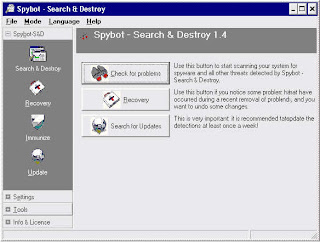
The first time SpyBot launches, you will be asked if you wish to create a backup of registry, check for updates (they regularly update the list of spyware that SpyBot detects), and immunize your system from known spyware. Say "yes" to all of these.
Now click Search & Destroy from the navigation bar and then select Check for problems.
After scanning your hard drive, SpyBot will list all Spyware, Adware, Exploits and tracking cookies that it finds. Make sure all items are selected and then click Fix selected problems.
SpyBot may not be able to remove some items that are currently running, in that case it will ask if you want to run again the next time the computer is restarted.
HijackThis (Freeware) Hijackthis is a program that is designed for the advanced removal of malware, spyware, worms and Trojans from your system. Basically it scan the registry and other locations of your computer where spyware is commonly found. It therefore lists areas where spyware and adware could be found like items contained in the system startup, hosts file that may call up unwanted websites as well as all browser objects like Toolbars etc.
Hijackthis can help in hard to remove items of spyware and adware that spyware removal programs may not be able to detect yet. It is an advanced software and is recommended for advanced users since you have to manually remove only some items from your system because some are needed for system functionality. You can save the log file and get assistance from advanced users.
This tutorial is designed to give you an overview of how the program works. If you are unsure about something you should leave it and ask for help. Remember before using HijackThis, Scan with at least two spyware removal (Ad-aware and Spybot S&D)
R0, R1, R2, R3 - Internet Explorer Start/Search pages URLs
F0, F1 - Autoloading programs
F2, F3 - Autoloading programs mapped to the Registry
N1, N2, N3, N4 - Netscape/Mozilla Start/Search pages URLs
O1 - Hosts file redirection
O2 - Browser Helper Objects
O3 - Internet Explorer toolbars
O4 - Autoloading programs from Registry
O5 - IE Options icon not visible in Control Panel
O6 - IE Options access restricted by Administrator
O7 - Regedit access restricted by Administrator
O8 - Extra items in IE right-click menu
O9 - Extra buttons on main IE button toolbar, or in IE 'Tools' menu
O10 - Winsock hijacker
O11 - Extra group in IE 'Advanced Options' window
O12 - IE plugins
O13 - IE DefaultPrefix hijack
O14 - 'Reset Web Settings' hijack
O15 - Unwanted site in Trusted Zone
O16 - ActiveX Objects (aka Downloaded Program Files)
O17 - Lop.com domain hijackers
O18 - Extra protocols and protocol hijackers
O19 - User style sheet hijack
O20 - AppInit_DLLs Registry value autorun
O21 - ShellServiceObjectDelayLoad (SSODL) autorun Registry key
O22 - SharedTaskScheduler autorun Registry key
O23 - NT Services
Start HijackThis and Click on Do System Scan only. When the scan is complete check all the unnecessary items which should be removed, and Click on the Fix checked button. A confirmation box will appear. Click Yes. HijackThis will now remove the checked items.


